
Will My Resume Pass the ATS? How to Know Before You Apply (2026)
Most advice on passing the ATS is generic and unmeasured. Here is what the data actually shows about pass rates by role — and a concrete way to check whether your resume will clear screening before you hit submit.
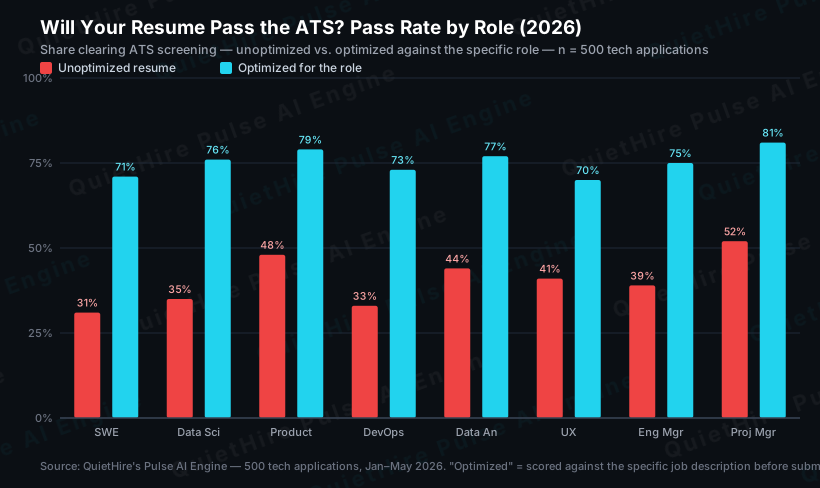
Only about 38% of unoptimized tech resumes pass automated screening — 62 out of every 100 are filtered before a human ever opens them. That number comes from our analysis of 500 real tech applications, and it is the honest answer to the question every job seeker quietly asks: will my resume actually pass the ATS, or am I shouting into a void? The good news is that "pass rate" is not a coin flip you cannot influence — it is a measurable property of your resume that you can check and fix before you apply.
Key Takeaway
You do not have to guess. Whether your resume passes the ATS comes down to a few concrete, checkable things — keyword match against the specific job description, formatting the parser can read, and standard structure. In our benchmark of 500 tech applications, resumes optimized against the specific role passed at roughly 74%, versus 38% unoptimized — nearly double. Here is what that looks like by role, and how to verify your own resume before you submit it.
What "Passing the ATS" Actually Means
An applicant tracking system is not one gate — it is the front of a stack. When you hit submit, your resume typically goes through:
- Parsing. The ATS converts your document into structured fields (work history, skills, education). If your formatting breaks the parser, your content is garbled or dropped before anything is even scored.
- Keyword and criteria scoring. The system scores your resume against the job description — the specific titles, skills, and phrases the role calls for — and ranks you against other applicants.
- AI-based screening. A growing number of employers layer newer AI screeners on top of the classic ATS. These look beyond exact keywords to semantic fit, and they keep changing.
- The recruiter skim. If you clear the automated gates, a human spends seconds deciding whether to keep reading.
"Passing the ATS" really means clearing gates 1 and 2 cleanly enough to reach gates 3 and 4. Most advice only addresses formatting (gate 1) and stops there. The data shows the bigger lever is gate 2 — role-specific keyword match — which is exactly where unoptimized resumes lose the most ground.
Why Most Resumes Fail (and It Is Fixable)
In our 500-application dataset, three issues accounted for the overwhelming majority of failures:
- Missing role-specific keywords. The average unoptimized resume matched only about 9 of the ~23 scoreable keywords in a typical tech job description — a ~39% match. Optimized resumes hit 18–21. Keyword match is the single biggest driver of pass rate, and it is role-specific: the profile for a backend engineer at a fintech is not the profile for the same title at an AI-native startup.
- Formatting that breaks parsing. Multi-column layouts, tables inside the body, headers/footers, and graphics get read as garbled text or skipped. Software engineers were the most affected group in our data — partly because they gravitate to visually designed templates — and had the lowest baseline pass rate (31%).
- Generic summaries. A vague objective statement adds no keyword value. A targeted three-sentence summary written for the specific role adds matched keywords that appear nowhere else.
None of these require a redesign or a gimmick. They require matching your resume to the role the way the screening system does.
How to Check Whether Your Resume Will Pass — Before You Apply
You can test this yourself rather than hoping:
- Compare your resume to the exact job description, not a generic checklist. Pull the posting and highlight every hard skill, tool, certification, and role-specific phrase. If those terms are not on your resume — in your own true experience — you are losing match points. A generic ATS checker scores against an average keyword list; the real ATS scores against that posting. That is the difference between a comforting score and an accurate one.
- Confirm the parser can read it. Save as a single-column document with standard section headers (Experience, Skills, Education), no tables or text boxes, and a common font. If you paste your resume into a plain-text editor and it comes out scrambled, the ATS sees it scrambled too.
- Check structure and quantification. Standard headings the parser recognizes, action-verb bullets that mirror the role's language, and quantified achievements (%, $, time, team size) in every entry.
- Re-check per application. Because gate 2 is role-specific and the screening stack keeps evolving, a resume that passed for one role will not automatically pass for the next. The right cadence is per application, not per month.
For the formatting mechanics in detail, see our guide on how to optimize your resume for ATS. For the full numbers behind the chart above, see the complete ATS pass-rate study. And if you are weighing tools to do the checking, our honest comparison of Jobscan alternatives covers what each actually measures.
The Honest Caveat
Passing the ATS is necessary, not sufficient. Clearing the automated gates only gets you seen — what happens next depends on fit, experience, and a recruiter's judgment. And because employers continuously add and change screening systems, no tool can promise a fixed pass rate forever. What you can do is keep the foundation correct and current: a resume matched to the specific role, in a format the parser reads, refreshed as the market shifts. That is the part within your control, and the data says it roughly doubles your odds of being seen.
Frequently Asked Questions
How do I know if my resume is ATS-friendly?
Check three things against the specific job posting: does it use the role's actual keywords (real to your experience), is it a single-column document with standard headings the parser can read, and does it avoid tables, columns, headers/footers, and graphics? If you paste it into a plain-text editor and it stays readable and in order, the parser can read it too. Scoring it against the exact job description — not a generic checklist — tells you the rest.
What percentage of resumes pass the ATS?
In our benchmark of 500 tech applications (January–May 2026), about 38% of unoptimized resumes passed automated screening, versus roughly 74% when optimized against the specific role. Baselines vary by role — software engineers were lowest at 31%, project managers highest at 52% — largely because of formatting habits and how role-specific the keyword profile is.
Does a PDF pass the ATS, or do I need Word?
Most modern systems parse both, but a clean single-column .docx is the safest default because it parses most consistently across systems. The bigger risk is not the file type — it is multi-column layouts, tables, and graphics inside either format. Check the application's instructions, and when in doubt, submit the simplest parseable version.
Will an AI screener reject my resume even if it passes the classic ATS?
It can. Newer AI-based screeners evaluate semantic fit beyond exact keywords, and they keep changing as employers adopt them. That is why beating one static keyword checklist is not enough — the resume needs to match the role's real requirements, and your approach has to stay current as new systems appear rather than relying on a one-time fix.
How often should I re-check my resume against the ATS?
Per application. Because keyword scoring is role-specific and the screening stack evolves, a resume that passed for one posting can fall short on the next. Re-checking against each specific job description is what keeps your pass rate high.
Want to see your real ATS pass rate against a specific job description — before you apply, not after the rejection?
Check your resume with Pulse — free →
No credit card. Results in under 60 seconds.
Ready to optimize your resume?
The Pulse AI Engine scores your resume against the actual job description in under 60 seconds.